Getting the Apple education discount is one of the smartest moves students and teachers can make to save hundreds of dollars on Apple products. You can access exclusive education pricing on MacBooks, iPads, Apple Watches, and more through the Apple Education Store. This guide walks you through eligibility requirements, the verification process, and tips to maximize your savings every step of the way.
Apple products are amazing, but let us be honest, they are not cheap. A new MacBook can easily cost over a thousand dollars, and iPads are no slouch either. But here is some great news. Apple offers a special education discount that can save you a serious chunk of change. Whether you are a college student heading back to campus, a teacher stocking your classroom, or a parent buying for a kid in school, this discount can make Apple gear much more affordable.
In this guide, we will walk you through everything you need to know about how to get the Apple education discount. We will cover who qualifies, how to verify your status, what products are included, and how to squeeze out every last dollar of savings. By the end, you will have a clear roadmap to grab your favorite Apple devices at a price that actually makes sense.
Key Takeaways
- Eligibility is broad: Students, teachers, and staff at accredited institutions all qualify for Apple education pricing.
- Verification is simple: You can verify your status through UNiDAYS, SheerID, or by uploading school documentation.
- Savings are significant: You can save up to $200 or more on MacBooks and iPads alone.
- Bonus perks exist: Free Apple Music student subscription and AirPods deals often come with your purchase.
- Timing matters: Back-to-school promotions and seasonal sales can stack with education pricing for even bigger discounts.
- Multiple product lines qualify: Macs, iPads, Apple Watches, and accessories all fall under education pricing.
📑 Table of Contents
- What Is the Apple Education Discount?
- Who Qualifies for the Apple Education Discount?
- How to Get the Apple Education Discount: Step by Step
- Products Covered by the Education Discount
- Tips to Maximize Your Apple Education Savings
- Common Mistakes to Avoid
- Final Thoughts on Getting the Apple Education Discount
What Is the Apple Education Discount?
The Apple education discount is a special pricing program Apple offers to students, teachers, and staff at accredited educational institutions. It is Apple’s way of giving back to the education community and making their technology more accessible. Through the Apple Education Store, eligible buyers can purchase products at reduced prices compared to the regular retail cost.
Here is what makes this discount so appealing. The savings apply across a wide range of products. You are not limited to just one category. From MacBooks and iPads to Apple Watches and accessories, the discount touches many items in the lineup. And the best part, the prices are already reduced at checkout, so no complicated coupon codes are needed.
How Much Can You Save?
The exact savings depend on the product you are buying. On MacBooks, you can typically save between $50 and $200. iPads usually see discounts of around $50 to $100. Apple Watches and AirPods also have reduced prices. When you add up these savings across multiple devices, the total can be quite impressive.
For example, a student buying a MacBook Air, an iPad, and a pair of AirPods could easily save over $300 in total. That is money you can put toward textbooks, software, or just about anything else you need. It really adds up fast when you are shopping smart.
Who Qualifies for the Apple Education Discount?
One of the best things about the Apple student discount is that the eligibility criteria are pretty inclusive. You do not need to be enrolled in a specific program or studying a particular subject. As long as you are part of the education world, you likely qualify.
Students
If you are a current college or university student, you are eligible. This includes undergraduate, graduate, and doctoral students. Community college students also qualify. Some homeschooled students may be eligible as well, though the rules can vary. High school students at accredited institutions may also be included in some regions.
Teachers and Education Staff
Teachers at all levels, from elementary school to university, qualify for the teacher discount Apple offers. This extends to homeschool teachers, parents who homeschool their children, and staff members at educational institutions. Even part-time teachers and teacher’s assistants may be eligible.
Parents Buying for Students
Parents who are purchasing Apple products for their college-bound children can also take advantage of the education pricing. You do not need to be the one enrolled in school. Just have a child who is attending or planning to attend an accredited institution, and you are good to go.
How to Get the Apple Education Discount: Step by Step
Now that you know who qualifies, let us get into the actual process. Getting the Apple education discount is straightforward, but there are a few steps you need to follow carefully.
Step 1: Visit the Apple Education Store
Start by going to the Apple Education Store website. You can access it directly through Apple’s main site by navigating to the Education section. The education store has the same great products as the regular store, but with special pricing already applied. You will notice the discounted prices right on the product pages.
Step 2: Verify Your Education Status
Before you can see the education prices, you need to verify that you are eligible. Apple uses third-party verification services to confirm your status. The two main platforms are UNiDAYS and SheerID. Both are secure and widely trusted.
Here is how the verification process typically works:
- You are redirected to the verification platform after clicking on an education-priced item.
- You create an account or log in if you already have one.
- You upload proof of your education status, such as a student ID, transcript, or enrollment letter.
- The system verifies your information, usually within minutes.
- Once verified, you gain access to the education pricing for a set period.
Step 3: Shop and Checkout
Once your status is verified, you can browse the education store and add products to your cart. The discounted prices will be automatically applied. When you check out, you will see the savings reflected in your total. No extra codes or coupons are required.
Step 4: Explore Bonus Offers
Apple often runs back to school Apple promotions that stack on top of the education discount. These can include free AirPods, Apple Gift Cards, or special financing options. Keep an eye out for these seasonal deals, especially during the summer and early fall months.
Products Covered by the Education Discount
The Apple education pricing covers a wide range of products. Let us break down what you can save on.
MacBooks
The MacBook Air and MacBook Pro are the most popular items in the education store. These are the devices most students and teachers reach for. The discount on MacBooks is usually the most substantial, making it one of the best reasons to shop through the education store.
iPads
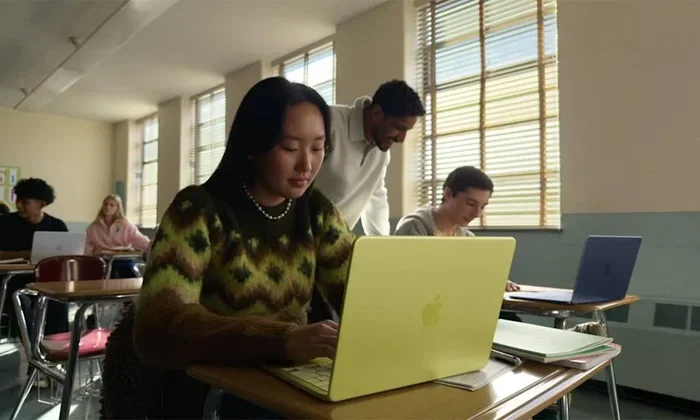
iPads are a staple for many students, especially those in creative fields or younger learners. The education discount on iPads can bring the price down to a more manageable level. Pair it with an Apple Pencil and a keyboard, and you have a powerful learning setup.
Apple Watches and AirPods
While the savings on these accessories may be smaller, they still count. Apple Watch and AirPods are popular add-ons for students who want to stay organized and connected. The education discount applies to these as well.
Accessories and Software
Do not forget about accessories and software. Cases, keyboards, mice, and even some apps may qualify for education pricing. It is worth checking the education store for these smaller items too.
Apple Music and Apple One
Apple also offers a discounted Apple Music student subscription. For just a few dollars a month, students can enjoy Apple Music ad-free. Apple One bundles may also have special education pricing, giving you access to multiple Apple services at a reduced rate.
Tips to Maximize Your Apple Education Savings
Getting the discount is just the beginning. Here are some practical tips to help you save even more when shopping for Apple products.
Shop During Back-to-School Season
Apple typically runs special promotions during the back-to-school period, usually from July through September. During this time, you may get free AirPods or Apple Gift Cards with your purchase. Combining these promotions with the education discount creates a powerful savings opportunity.
Check for Refurbished Options
Apple also sells refurbished products through its own store. These devices are tested, certified, and come with a warranty. When you pair a refurbished product with your education discount, the savings can be even greater.
Compare Prices Before Buying
Even with the education discount, it is always a good idea to compare prices. Check other retailers, Amazon, and authorized resellers. Sometimes a competitor may offer a better deal, even after accounting for the education pricing.
Use Apple Financing Options
Apple offers 0% APR financing for qualified buyers. This allows you to spread the cost of your purchase over several months. When you combine financing with the education discount, your monthly payments become very manageable.
Keep Your Verification Active
Your education verification typically lasts for a limited time. Make sure you complete your purchases while your status is still active. If you need to buy additional items later, you may need to re-verify your status.
Common Mistakes to Avoid
Here are some pitfalls to watch out for when trying to get your Apple education discount.
- Waiting too long. Back-to-school deals are time-sensitive. Procrastinating can mean missing out on the best offers.
- Forgetting to verify. You will not see education prices until your status is confirmed. Do not skip the verification step.
- Assuming all products are discounted. Some accessories and older models may not qualify. Always check the price before adding to cart.
- Ignoring seasonal promotions. Apple runs multiple sales throughout the year. Do not limit yourself to just the back-to-school window.
- Not checking refurbished options. Refurbished products can offer even deeper savings than the education discount alone.
Final Thoughts on Getting the Apple Education Discount
The Apple education discount is one of the best deals available for anyone in the education world. Whether you are a student, a teacher, or a parent, the savings are real and significant. By following the steps in this guide, you can confidently navigate the Apple Education Store and grab the best deals on your favorite products.
Remember, the key is to act early, verify your status, and keep an eye out for seasonal promotions. With a little planning, you can save hundreds of dollars on Apple gear. So go ahead, take advantage of this amazing opportunity, and get the Apple products you need at a price that works for you.
And if you want to learn more about language and education, check out these education idioms, education similes, and education metaphors to expand your vocabulary while you save money on your next Apple purchase.
Frequently Asked Questions
Who is eligible for the Apple education discount?
Current students, teachers, staff, and parents of students at accredited educational institutions can all qualify. This includes college, university, community college, and some high school students.
How do I verify my student status for Apple?
You verify through UNiDAYS or SheerID by uploading proof of enrollment, such as a student ID, transcript, or enrollment letter. The process is quick and usually takes just a few minutes.
Can parents buy Apple products at education prices?
Yes, parents who are purchasing devices for their college-bound children can access education pricing. You just need to verify that your child is enrolled or planning to enroll at an accredited institution.
What products are included in the Apple education discount?
The discount covers MacBooks, iPads, Apple Watches, AirPods, accessories, and select software. Apple Music student plans and Apple One bundles may also have special education pricing.
When is the best time to buy Apple products with the education discount?
The back-to-school season from July through September is the best time. Apple runs special promotions during this period, often including free AirPods or gift cards with purchase.
Does the Apple education discount apply to refurbished products?
The education discount applies to new products in the Education Store. However, Apple also sells refurbished products separately, which can offer additional savings on top of any promotions you find.
=== CONCLUSION ===
The Apple education discount is a fantastic way to save money on the devices you need for school or teaching. With straightforward eligibility, easy verification, and savings across multiple product lines, there is really no reason not to take advantage of it. Follow the steps outlined in this guide, keep an eye on seasonal promotions, and you will be well on your way to getting the best deals on Apple products. Start your shopping journey today and make your education budget go further.