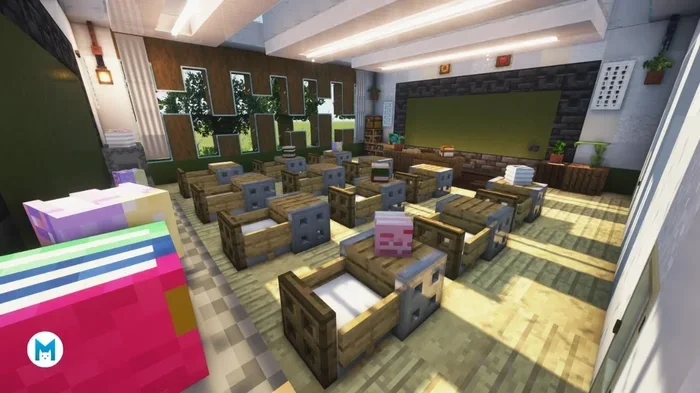
Minecraft Education Edition is a specialized version of Minecraft designed for classroom learning. It turns game-based play into powerful educational experiences for students of all ages. Teachers use it to teach STEM concepts, creativity, and collaboration in a virtual world. The platform includes built-in lesson plans, teacher tools, and safe multiplayer environments. If you are curious about how gaming and education can merge, this guide covers everything you need to know.
Have you ever wondered how a video game can change the way kids learn? Minecraft Education Edition does exactly that. It takes the beloved block-building game and reshapes it into a powerful classroom tool. Teachers around the world use it to make lessons more interactive and fun.
In this article, we will break down everything you need to know. You will learn what the platform is, how it works, and why so many schools are adopting it. Whether you are a teacher, parent, or student, this guide will give you clear answers. Let us dive in and explore this exciting world of educational gaming.
Key Takeaways
- Game-Based Learning Platform: Minecraft Education Edition uses the familiar Minecraft world to deliver structured lessons and activities.
- Built for Classrooms: It includes teacher tools, lesson plans, and secure multiplayer features designed specifically for schools.
- Cross-Curricular Flexibility: The platform supports teaching STEM, history, language arts, and more through immersive projects.
- Free and Accessible: Many schools and educators can access it at no cost with a valid Office 365 Education account.
- Boosts Student Engagement: Kids stay motivated because learning feels like play, which improves retention and participation.
- Safe and Controlled: Teachers manage the environment, so students learn in a secure digital space.
📑 Table of Contents
- What Is Minecraft Education Edition?
- How Minecraft Education Edition Supports Learning
- Key Features for Teachers
- Why Schools Are Adopting Minecraft Education Edition
- Getting Started with Minecraft Education Edition
- Common Mistakes to Avoid
- Expert Insights on Game-Based Learning
- Minecraft Education Edition vs. Traditional Classroom Tools
- Final Thoughts
What Is Minecraft Education Edition?
Minecraft Education Edition is a special version of Minecraft built for learning. It runs on the same block-building mechanics as the original game. But it adds features that teachers and schools need for structured lessons. Think of it as a digital sandbox where education meets creativity.
The platform was developed by Mojang Studios and Microsoft. It launched in 2016 and has grown rapidly since then. Today, millions of students in over 100 countries use it. Schools integrate it into subjects like math, science, history, and even language arts. It proves that game-based learning is not just a trend, it is a real teaching strategy.
How It Differs from Regular Minecraft
You might wonder how this version differs from the standard game. The core building experience stays the same. But Education Edition includes tools that regular Minecraft does not have.
- Classroom Mode: Teachers can view a map of the entire class world from above.
- Non-Player Characters (NPCs): Teachers can add NPCs that give students instructions or links to resources.
- Camera and Portfolio: Students can take photos of their builds and save them as learning portfolios.
- Code Builder: This feature lets students learn coding by programming agents inside the game.
- Border Blocks: Teachers can set boundaries to keep students focused on specific areas.
These tools make it clear that this is not just a game. It is a full educational platform designed with teachers in mind.
How Minecraft Education Edition Supports Learning
One of the biggest strengths of this platform is how it supports different types of learning. It is not limited to one subject or one age group. Let us look at the key ways it helps students grow.
STEM Education Made Fun
STEM education stands for Science, Technology, Engineering, and Math. Minecraft Education Edition is a natural fit for these subjects. Students can build complex structures and learn about architecture and engineering. They can explore ecosystems and biomes to understand science concepts. The Code Builder feature introduces block-based coding and even JavaScript, making coding for kids accessible and enjoyable.
For example, a teacher might ask students to build a working circuit using redstone. This teaches basic logic and electrical concepts. The student does not just read about it. They build it, test it, and see the results in real time.
Creative and Collaborative Learning
The game encourages creative mode exploration, where students build without limits. They can design historical landmarks, model molecules, or create entire civilizations. This kind of open-ended play builds problem-solving skills and digital literacy.
Collaboration is another major benefit. Students work together on shared projects in a virtual classroom. They learn to communicate, delegate tasks, and combine ideas. These are skills that carry over into real-world teamwork.
Cross-Curricular Projects
Teachers use Minecraft Education Edition across many subjects. Here are some practical examples:
- History: Students recreate ancient Rome or the Great Wall of China.
- Language Arts: They write stories set inside their Minecraft worlds and build scenes from them.
- Math: They calculate area and volume while designing buildings.
- Art: They pixel-art sculptures and learn about design principles.
The flexibility of the platform means almost any subject can find a home inside the game. It also helps with curriculum integration, which is a priority for many schools today.
Key Features for Teachers
Teachers need the right tools to make classroom learning effective. Minecraft Education Edition comes packed with features that simplify lesson delivery.
Lesson Plans and Curriculum Support
Microsoft provides a library of ready-to-use lesson plans. These cover a wide range of grades and subjects. Teachers can browse, download, and adapt them to fit their classroom needs. This saves hours of prep time and gives new users a strong starting point.
Teacher Controls and Safety
Safety is a top concern when using games in schools. This platform addresses that directly. Teachers can control who enters the world. They can restrict building in certain areas. They can even freeze students who go off task. The teacher tools give educators full oversight without taking away the fun.
Assessment and Feedback Tools
Checking student progress is easier with the portfolio feature. Students document their work through photos and written notes. Teachers can review these portfolios and provide feedback. This creates a natural loop of learning outcomes that both students and teachers can track.
Why Schools Are Adopting Minecraft Education Edition
The rise in popularity of this platform is no accident. Schools see real results when they bring it into the classroom. Here are the main reasons why Minecraft for schools is gaining traction.
Boosts Student Engagement
Students who sometimes struggle with traditional lessons light up when they enter the game. The familiar Minecraft environment removes the fear of learning something new. They are already comfortable with the controls and the world. This means they can focus on the educational content instead of figuring out how the tool works.
Encourages Independent Thinking
When students build in Minecraft, they make decisions constantly. They plan, design, test, and rebuild. This process mirrors real-world critical thinking. They learn that failure is just part of the process, and every attempt teaches something new.
Supports Different Learning Styles
Not every student learns the same way. Some are visual learners. Others are hands-on. Minecraft Education Edition serves all of them. Visual learners benefit from the colorful, immersive world. Hands-on learners thrive because they can build and touch everything. This makes it a powerful tool for inclusive education.
Builds Digital Citizenship
Working in a shared digital world teaches students how to behave online. They learn respect, responsibility, and communication. These are essential digital citizenship skills. Teachers can use in-game scenarios to discuss internet safety and online etiquette.
Getting Started with Minecraft Education Edition
If you are a teacher or parent ready to try this platform, getting started is straightforward. Here is a simple roadmap.
Step 1: Check System Requirements
The game runs on Windows, Mac, iPad, and Chromebook. You need a reliable internet connection and a Microsoft account. Schools using Office 365 Education can often access the game at no extra cost.
Step 2: Set Up a World
Teachers can create a new world or use one of the many lesson templates. Start with something simple. A basic build challenge works great for the first session. You can always add complexity as students get more comfortable.
Step 3: Introduce the Lesson
Walk students through the learning objective before they enter the game. Use NPCs to give clear instructions inside the world. Set boundaries so everyone knows the scope of the activity. This keeps the session focused and productive.
Step 4: Observe and Guide
Use Classroom Mode to monitor student activity. Jump into the world yourself and model good behavior. Offer encouragement and hints when students get stuck. The goal is to guide, not to control every action.
Step 5: Debrief and Reflect
After the session, gather students for a discussion. Ask what they built, what challenges they faced, and what they learned. Use the portfolio feature to review their work together. This reflection step is where real learning outcomes solidify.
Common Mistakes to Avoid
Even with a great tool, mistakes can happen. Here are a few pitfalls to watch out for.
- Skipping the Lesson Plan: Just letting students play without a goal wastes the educational value. Always connect the activity to a clear learning objective.
- Overcomplicating the Setup: Start simple. A complicated first lesson can frustrate both teachers and students.
- Ignoring Safety Settings: Take time to configure world settings and permissions before students join.
- Not Debriefing: The discussion after the session is just as important as the activity itself.
Avoiding these mistakes will help you get the most out of every session. A little planning goes a long way.
Expert Insights on Game-Based Learning
Many educators and researchers support the use of games like Minecraft in the classroom. Studies show that immersive learning environments improve retention and motivation. When students are engaged, they absorb more information without even realizing it.
Experts also point out that similes and metaphors used in game contexts help students understand abstract ideas. For instance, describing a redstone circuit as “the nervous system of a Minecraft building” creates a powerful mental connection. Similarly, using similes for education can make technical concepts feel more relatable. The same applies to metaphors for education, which help students visualize complex topics through familiar comparisons. Even idioms for education can be woven into creative writing challenges inside the game, adding a linguistic layer to the building experience.
These language tools work hand-in-hand with game-based platforms. They give students new ways to express what they learn and deepen their understanding.
Minecraft Education Edition vs. Traditional Classroom Tools
How does this platform compare to traditional teaching methods? Here is a quick side-by-side look.
| Feature | Traditional Tools | Minecraft Education Edition |
|---|---|---|
| Engagement Level | Moderate | Very High |
| Hands-On Learning | Limited | Extensive |
| Collaboration | Group work only | Real-time shared worlds |
| Creativity | Structured | Open-ended |
| Assessment Tools | Quizzes and tests | Portfolios and in-game tracking |
| Student Agency | Teacher-led | Student-driven exploration |
This comparison shows that the platform adds a dimension traditional tools often lack. It gives students ownership of their learning while keeping the teacher in control of the educational direction.
Final Thoughts
Minecraft Education Edition is more than a game. It is a bridge between what kids love and what they need to learn. It turns abstract concepts into hands-on experiences. It brings quiet students into the spotlight through collaborative builds. And it gives teachers a versatile tool that works across subjects and grade levels.
The world of educational gaming is growing fast. Platforms like this one prove that learning does not have to feel like a chore. When students are having fun, they remember more and care more. That is the real power of this tool.
If you have not yet explored this platform, now is a great time to start. Try a simple lesson, see how your students respond, and build from there. The possibilities inside the blocky world are truly endless.
Frequently Asked Questions
Is Minecraft Education Edition free?
It is free for eligible schools and educators who have a valid Office 365 Education account. Microsoft offers this to support classroom learning in schools worldwide. You can check eligibility on the official Microsoft Education website.
What age group is Minecraft Education Edition suitable for?
It is designed for K-12 students, which means it works for elementary through high school. Teachers can adapt lessons to fit different age groups and skill levels. The platform is flexible enough for both younger learners and older students.
Can students use Minecraft Education Edition at home?
Yes, students can access the game from home if their school provides licenses. They need a compatible device and internet connection. This makes it easy to extend learning beyond the classroom walls.
Does Minecraft Education Edition require internet access?
An internet connection is required for multiplayer and cloud-based features. However, some single-player activities may work offline depending on the setup. Teachers should plan ahead and check their school’s network capabilities.
What subjects can be taught using Minecraft Education Edition?
The platform supports a wide range of subjects including math, science, history, language arts, art, and computer science. Teachers use it for STEM education projects as well as creative writing and social studies. The flexibility of the game allows it to adapt to almost any curriculum.
How does Minecraft Education Edition help with coding skills?
The Code Builder feature lets students write code to control agents inside the game. They can learn block-based coding first and then progress to JavaScript. This introduces coding for kids in a fun, visual way that builds logical thinking and problem-solving skills.
=== CONCLUSION ===
Minecraft Education Edition has changed the way many classrooms approach learning. It blends the joy of gaming with the structure of education in a way that resonates with students. From STEM education to creative writing, the platform opens doors that traditional methods sometimes struggle to open. Teachers get powerful tools to guide, assess, and inspire. Students get a world where they can build, explore, and grow.
The evidence is clear. When learning feels like play, students show up with more energy and curiosity. Minecraft Education Edition delivers on that promise every single day. Give it a try and see the difference it can make in your classroom.